
Notes of the OpenUSD Roundtables at GDC 2026
This year we had 2 OpenUSD roundtables, lasting one hour each, with around 50 participants each. For those who have never attended a roundtable: This is a room filled with mostly game developers, from both big studios and indie studios, as well as non-game developers from manufacturers, robotics, automotive, vendors, and service providers. The folks in the room ask questions, and then anyone in the room can raise their hand to answer those questions. This information is unfiltered, as discussed by the attendees of the roundtable, written down after the fact from my own memory and some shorthand notes, so always take it with a grain of salt. Your own situation may vary. If you want to host your own roundtables, I wrote about how you can successfully do that here.
Sometimes I insert my own thoughts into these notes, and that is denoted by being (between brackets like this.)
Day 1
1. Best USD thing that happened this year
First we opened the floor to anyone for what they thought was the best USD thing that had happened with their studio this year.
Someone said that their cinematics pipeline at a AAA developer had transitioned entirely to USD. This was very useful for them as in the cinematics they used many different assets from different games, so USD made that workflow of re-using assets for different purposes much easier.
Another person said that they started using USD for motion capture, which made them move away from FBX, which they were very happy about due to USD animation data being much easier to work with in their experience.
A few folks mentioned that they liked how performant USD is. It allowed them to get a view of their assets much more easily and quickly.
The ASCII file format of USD was also mentioned as very helpful in workflows, as it allowed folks to quickly see what is in a file, edit that file manually, and also easily diff it.
2. Worst USD thing that happened this year
Then we opened the floor for anyone to share their bad USD experiences this year.
Someone mentioned having a lot of data loss in their pipeline due to USD, which many other folks immediately echoed as a problem they had also ran into. They all dealt with data getting lost somewhere during their pipeline, and it being very frustrating to find out that it did, as well as to find a solution to the problem. Often it took a lot of effort to find out where the data was lost.
Another issue many folks ran into was that the USD API was very difficult to understand. Some studios had started to use USD, but due to the difficulty of the documentation found it very time consuming to get their pipeline running.
Inconsistent DCC support was another big problem. Each DCC has a different set of features that they initially focus on with USD, and this made it both difficult to work with, as well as difficult to share information and tips between users. For example if you use Unreal and Maya with USD, and someone else uses Unreal and Houdini, then you may not be able to easily share experiences in a helpful way, as even though you are both using USD, the pipelines, plugins, and features differ too much.
We then discussed how we can troubleshoot data loss and pipeline issues, as it had come up from so many people at the roundtable. Folks brought up that you need to have validation steps in the pipeline to catch issues, and to view the USD source data regularly to check if you lost any data. The ASCII file format was seen as very useful for this purpose.
(Those answers seemed good, but I went to chase this down further after the roundtable, especially because so many studios mentioned it as a problem. I asked Wave during an ASWF meeting for the game USD working group, and through that discussion we figured out this is probably because those studios are importing and exporting data from DCCs. USD plugins for DCCs are often still in beta, and are not fully featured. Add in that USD has thousands of features, and each company makes their own plugins, which then means they all have different features that they initially prioritize. So then when you export and import USD files, data gets lost. According to Wave, the more proper way to work with USD is to have a USD file, or files, for each DCC, which are then all layered or referenced by a final layer that is used in-engine. That way no import or export occurs at any time.
There are, however, sometimes good reasons for studios to not do this yet. For example, if the studios use a different file format elsewhere in the pipeline, and transition only the environment art pipeline to USD, or only the cinematics pipeline to USD, then they do not have the easy ability to layer all your data yet. So in a transition period to USD, it is important to keep in mind that DCC plugins are not fully featured yet, and could cause data loss when importing & exporting.)
3. USDZ, who uses it, and what for?
Not many studios used USDZ. It was seen as an end result format, and not something you would use within a pipeline for game development. It was seen as a good way to package up content to quickly share with someone, such as a one-off way of sharing the content as a single file.
It was seen as very powerful within the Apple ecosystem, between various devices including the Vision Pro, and again for individual assets rather than entire projects or within a pipeline.
A reason for the lesser usage of USDZ was a problem that folks saw with USDZ forcing a flattening of the layers. (After discussing this in the ASWF Game USD working group, we realized this is probably a misconception. The resulting USDZ has, within it, the layers of the USD setup. For example, renaming a USDZ file to .zip allows you to see these files, and view them individually. However, it was also said that USDZ has a limit of 65535 files, and 4GB file size limit.)
4. Best practices for rendering USD in Maya
Turns out that most folks do not do any rendering in their own DCC. The usual game development workflow is not to build USD content in a DCC and then rendering it out in that DCC, like Maya for example. You would use Unity, Unreal, Godot, or an in-house engine to real time render the content. So there were not any best practices to share for offline rendering.
5. Building USD, and the size of USD
Someone who works on Godot was present, and they mentioned that including USD in Godot is not possible due to the USD API being 200+ megabytes. This is too large for a small editor that folks want to download from around the world. Sadly this is a known problem, and nobody has a solution for it at the moment.
The person working on Godot then also mentioned wanting to build better USD tooling inside Godot, and was wondering if any funding was available to help facilitate this. There was some hope that larger companies could reach out to the Godot Foundation, and see what assistance can be provided.
(Personally I feel USD support in Godot would be a tremendous boon to the ecosystem of USD. At the moment all good USD editors are behind licenses and fees, so having a free and easily downloadable one, that is also open source, would help expand the userbase greatly. Nick Porcino did make a USD plugin for Godot, as did a Miguel de Icaza after I spoke to him at GodotCon in Amsterdam. I hope one of the AOUSD companies can help finanance a default USD editing environment inside Godot.)
6. How to get started with USD
A classic topic that always comes up each year. A few folks mentioned video courses, such as my USD basics video, and other videos such as how to use Solaris in Houdini. Essentially the thought is: Learn Solaris, and go from there.
There is also the USD survival guide, and learning the Python glossary as USD is so heavily intertwined with Python.
And the ASWF GitHub has many examples on it (including my vehicle example assets, which are CC0 licensed).
One common thing that many agreed on was to not try and learn the entirety of USD in one go. It is so large of an API that it quickly becomes overwhelming. Instead, the advice was to make a small example project for yourself, with whatever you are specialized in. Such as a small animation if you are an animator, or a greybox scene if you are a level designer. Learn the features closest to your specialization, and then expand from there.
(In my personal opinion, what USD needs is a tutorial that is complete non-technical. One that does not that force you to install Python, use a terminal, or a compiler, but one that is simple and visual, for designers and artists. Such as having an example scene, a couple of simple props, and only some references and sublayering. No immediate complex materials, no need to understand LIVERPS, just some geometry content with a simple texture/material on it, which users can have a simply editing experience with to move and edit content around in various layers. This is much easier said than done, but in 4 years of teaching companies how to use USD, this is still the biggest and most important thing that I do not see happening. Most tutorials are extremely technical right away, and it scares off the actual eventual USD audience that we need for actual USD content: Non-technical artists and designers.)
7. OpenExec experiences
Someone asked if anyone has experience using OpenExec, but most people in a room did not know it existed, so there were not any experiences to share.
8. USD structuring best practices
The correct answer that kept coming up was a classic: It depends. There is no one tried and true way to organize USD files, set up hierarchies, and structure the data. As we also saw earlier in the roundtable, there are so many different pipelines and plugins that it is hard to share concrete advice, and different workflows are preferred for different studios and projects.
In the end the advice was: Create USD content so it works correctly for your pipeline, and iterate on it continually to improve it. Essentially this is similar advice as to the “How to get started with USD” topic. Try out multiple different ways, and you will discover what works well for your pipeline, and then you can make sure the USD content works well for you.
And that was all for day one.
Day 2
1. USD implementation pitfalls
What did people run into when trying to implement USD? Similar to what we heard the previous day, learning USD is still really difficult. The resources available on the internet are widespread, but often only technical. This made it very difficult for non-technical folks to get started working with pipelines, even if engineers were able to implement the technology into the pipeline.
(In the end, it’s often non-technical folks who actually make 3D content. If they cannot easily do that, then what is the use of USD?)
Another issue was that you needed pipeline engineers to be able to work with USD. The plugins are so often still in beta, and the pipeline is often so customized, that you need engineering help to implement USD into your pipeline. This means having engineering resources available, having someone willing to learn USD and go through the growing pains with it, and having them stick to that for an unknown return on investment in the future. This was seen as risky.
Another thing was that you kind of need to get what the folks in the room called “USD brained”. You have to learn so much about USD, how it works in such a particularly unique way, and with much of the terminology being film/movie based, which game folks are not used to. You have to develop a ‘USD brain’ to understand how it works in general, and to understand how it can work well for your project. Again this comes with a time commitment that can be difficult to advocate for.
A more practical issue that folks mentioned was the issue of edit targeting. If you have a whole bunch of layers, and you are editing a scene, then to which layer does the edit go? Is it the top layer, one of the referenced or payloaded layers, and is it an override or not? If so, to which layer does the override save? This can be very confusing and difficult to work with, especially depending on the UI of your DCC. Most DCCs do not clearly indicate what layer comprises which section of your scene, and where your edit goes to, and then you can accidentally make incorrect edits. Remedy did a great presentation about this two years ago where they talked about this as well (around 35:15 in this talk), where they showed how edit targeting is an issue for artists, and how their editor, Northlight, makes it easier to define to what layer target your edit goes.
2. Has anyone tried to move to USD, regretted it, and moved away again?
Yes, some folks had, but not many. A reason that they walked away from USD was that it was too slow to get started, with little fully formed tooling available. It was so rough to get started, with unclear tutorialization, and a giant wiki with so much technical documentation that while you could technically get started, you mostly have no idea where to actually start. That slowed down some studios too much, and so they stopped their USD transition.
Another issue that folks mentioned is that they found USD was bad for streaming data. If they wanted to load in data realtime, they found it just did not work well enough for them and so they decided they cannot use USD yet, until this is either resolved or easier to do, with final quality assets that are quite large in file size, and which are edited real-time in video game development.
(Of course this is a roundtable about USD, so there may way more studios who tried to use USD, did not like it, and then would not come to a roundtable about it, so as always take everything here with a grain of salt.)
3. Who is using USD for only environment art assets?
Instead of using USD for all 3D content, what about using USD for only simple, static props, and assets?
Turns out they were quite a few studios who were using USD for just their environment assets, keeping USD contained for now to only that pipeline, and nowhere else. The other parts of the pipeline would still be in other formats such as FBX. These studios found that environments are a good entry point for USD, in which they can slowly learn how to use it without getting into complications such as animations, and other specialized cases. It allowed them to get “USD brained” without as much risk and time investment.
They also found that only using it for environment assets made for much faster tool creation as it was focused only on particular features, as well as loading assets, as they were really happy about how fast USD worked when the entire environment art pipeline was functional in USD.
Another thing that folks liked from this was the inspection of assets. Being able to open up assets in ASCII made it much easier to inspect, debug, and also diff assets.
But, an issue that also came up is that the material pipeline is still quite bad for USD. MaterialX was supposed to help resolve this, but it has not. We sadly could not get into technical details within this roundtable time limit, but essentially: Material workflows still need to be better in USD to make for greater adoption. (Perhaps OpenPBR will be a better fit, and help resolve this issue? Sooner or later, time will tell.)
4. Who is using USD for character pipelines?
Turns out some studios were, but not as many as with environment art.
Embark had recently given a presentation about using USD for their character pipeline.
They mentioned they really liked that with USD they could move from procedural content to final content very quickly. Basically: They used Houdini’s procedural systems for characters parts, to automatically adjust clothing based on individual parts of the characters such as bags, cloaks, helmets, etc, and they saved this all to USD with lots of composition arcs.
Another thing was moving USD content from Houdini to Unreal, which they had mentioned worked well for them. In this case the source of truth was entirely in USD, in Houdini, and then they would export it to Unreal for final in-game setup, but that content would not be the source of truth.
Another powerful thing that was mentioned by someone was the ability to combine environment art and character art, if it is all built with USD. It made referencing content very easy, so you could for example make shoulder pads for a character out of previously created environment art, and the pads would change if the original environment art changed.
5. USD in films, vs USD in games
We wanted to have a discussion about the is, but the problem was that at GDC we really only had game developers, robotics, and other real time content creators in the room. There was not much representation from the film / movie business.
For some folks that did have a little experience, they said there there are some limitations in the USD format, for example with skeleton deformation. They experienced that this worked well for off-line rendering, but for real time rendering it did not work as well. In general they felt the real time versus off-line features for USD felt a little bit more offset to the off-line features. Which technically makes sense as USD was initially built for making movies by Pixar. However, exactly which parts we would like to see adjusted was not clear in the roundtable, as we simply were not that well versed in the film side of creation in this roundtable.
6. Custom schemas, who uses them, and what is that like?
Folks mentioned that custom schemas worked well for them, and that they are super happy about how customizable USD is. They loved custom schemas, but also noted again that this requires pipeline engineers to make it work well within your pipeline, and to use custom schemas to their fullest extent So if you have the resources available, custom schemas are powerful and useful. (I remember asking Remedy about how many custom schemas they had after their GDC talk 2 years ago, and they said the number was in the hundreds.)
However, there was one studio present at the roundtable who said they do not use any custom schemas at all. Literally zero. They were highly successful with their content and games, and the roundtable was shocked to hear they were able to do so much great work with USD while not using any custom schemas. This studio also said they were very happy with their pipeline.
7. Are any indie studios using USD?
A small amount of hands went up when we polled the room, about 5 hands, and even that was already extremely happy surprise to the whole room. Nobody suspected small studios would be using USD, but it turns out there are.
What these smaller indie studios liked about USD is that it worked really well in Houdini. They said they had much less of a pipeline engineering difficulty with USD, as Houdini already made USD very easy for them to work with.
Another thing those indie studios liked was that USD afforded them very fast viewing of assets. They found it allowed them to quickly load in and view assets whenever they needed to, especially if they had to load many assets. (It was interesting to note how much of a difference this was to previous comments about USD loading times. I am not sure what causes this discrepancy, but perhaps the tutorialization of USD could use more information about how to load it well?)
In particular for viewing assets, USDView was seen as super lightweight and fast to check out assets, without having to load a large DCC. In the indie space, they also really appreciated that this is a free app that they can quickly and easily install to view USD assets right away, though sadly it does not allow editing.
8. Using USD for production tracking
In this case the question was particularly: Do you have production tracking data directly into USD files? For example who last touched an asset, when they did so, if there are any tickets involved with this assets, etc.
There were really strong reactions from folks around the room, who all said: Absolutely do not ever do this. It becomes a giant mass. The advice was to keep your production tracking systems inside Shotgrid, Jira, Confluence, or elsewhere, but not save it into the USD files.
Other information, such as tags that say whether an asset is brick, wood, stone, etc, were seen as helpful and fine to have in assets. But, copying production data into USD was experienced as too complicated to work with, especially when you no longer know what the actual source of truth is. Having an external source of truth was seen as much better to work with.
And that was it for day two.
Some thoughts from myself
(Lastly, something that I noticed over the OpenUSD roundtables this year is that there are many more studios using USD. There were also many students who are using USD, as well as universities teaching it.
While USD was not the entire pipeline yet of the studios, or these students, it was used much more than in previous years, and the attendance for the USD roundtable this year was also much higher.
However, I think it is also a shame that all of these folks are bumping into almost the exact same issues as we discussed in the very first USD roundtable a few years ago. It has been 4+ years now of plugins being in beta, materials not working well enough, tutorials being technical instead of easily understandable for artists, and so much more. I think it is a big shame that when Pixar released USD, they did not also release Presto, which is their internal DCC and USD editing tool. I understand that is a huge ask, but without its release it landed USD in this situation where it is an extremely large and capable API, with super powerful features, that only technical folks can adopt. Houdini is doing a good job fulfilling the DCC needs to a degree, but it does require licensing and learning how to use Houdini, which is known in the industry as quite complex due to its UX being so different from other DCCs. So, I think that because Presto was not released we are still feeling the shock and issues of so many problems for non-technical users. [EDIT 21-07-2026, I stand corrected! At SIGGRAPH I was informed by Sebastian Grassia himself that Presto is not USD native! A shock to me, as I had no idea. Apparently Presto has its own internal data format. Pixar are currently implementing USD into Presto, but it wasn't USD native yet at the time of USD’s open source release. So releasing Presto next to USD would not have done any good in the past. Thank you so much for correcting me, Sebastian!]
But, we are seeing growth in the USD community, and we are seeing more usage. There are dozens of us, dozens!
Another great thing this year was that much less basic questions were asked. In previous years we would still get questions such as “What is USD, and why should I use it?” which we did not get this year. That is great progress!)
Thank you
Last but not least a big ‘Thank you!’ for everyone that attended the OpenUSD Roundtables at GDC 2026. I sincerely appreciate everyone who shared their own stories of both joy and woe as we all strive to create better tools & workflows for everyone. I hope to see you all again next year!
I hope to see you at SIGGRAPH 2026 as well, as me and Ezra Goss are hosting a USD Roundtable there as well!
If you want to learn how to host a great roundtable yourself, here is a guide.
Subscribe below to get updates when a new post is published.
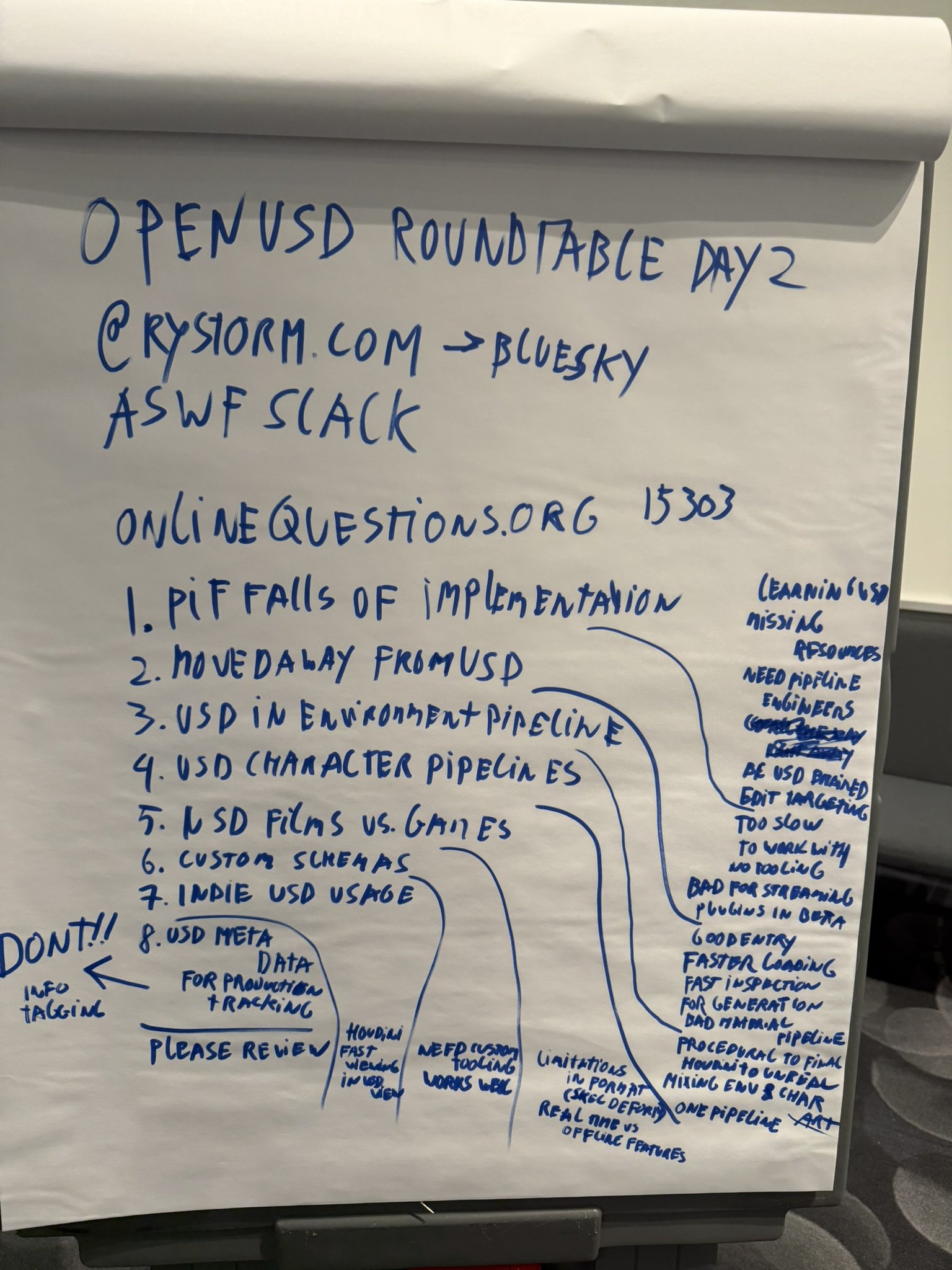
The end result of the board after the roundtable